Last checked against Google’s documentation on 30 September 2026.
How to audit a prospect’s Google Ads account: the short answer
To audit a prospect’s Google Ads account, ask the client to invite you with Read only access, and agree in writing what you will look at and what data they will share. Then check three things in order: whether conversion tracking matches the client’s own records, where money is being wasted, and where there is room to grow. Put honest ranges on each finding, show the math, and present three to five findings on a call, with a written report they keep. Then have your access removed, whether or not they hire you.
The order protects you. If you size waste before checking tracking, every number in your report may rest on conversions that never happened. And the access you ask for tells the prospect a lot about how you will treat their account once they pay you.
Ask for Read only access, nothing more
A Google Ads account has five access levels for its users. Google’s page About access levels in your Google Ads account describes what each can do:
| Access level | Can see | Can change | Use it for a pre-sale audit? |
|---|---|---|---|
| Email only | Notifications and emailed reports; not the campaigns | Nothing | No. You can’t see the account. |
| Billing | Billing and payment details | Payment information and payments; not campaigns | No. It’s for finance teams. |
| Read only | Campaigns, planning tools, billing information, reports | Nothing | Yes. This is the one to ask for. |
| Standard | Everything Read only sees | Campaigns, and conversions created from Google Analytics events | Only once you’re hired and it’s in the contract |
| Admin | Everything | Everything, including who has access and which manager accounts are linked | Never |
Read only is enough for an audit: you can see the whole account and you can’t edit any of it. That is least privilege, the smallest amount of access that does the job.
Option 1: the client invites your email
An Admin on the client’s account goes to Admin → Access and security, clicks the plus button, enters your email, chooses Read only and sends the invitation. You accept it from the email. Google walks through it in Manage access to your Google Ads account. Recommend this route for a pre-sale audit: the client chooses the level and can see exactly who has it.
Option 2: a link to your manager account
If you run a manager account, you can send a link request using the client’s customer ID, and an admin on the client account accepts it on the Managers tab under Access and security (see Link accounts to your manager accounts). Know what a link grants. Once linked, what each person at your agency can do depends on their access level in your manager account, not on anything the client picked, as Google explains in About user access levels for your manager account. If your team has Standard access there, they can edit the client’s account. Either save the link for after you’re hired, or give whoever runs the audit Read only access in your manager account.
How the client takes access back
The client stays in control. An admin removes a user under Admin → Access and security with Remove access in the Actions column, and removes a manager the same way from the Managers tab. Google’s page on ownership states that client account users can always unlink a manager, even one that owns the account. Tell the prospect this before they grant access. It lowers the risk they’re taking, and they will trust you more for saying it.
If you use an audit tool
Most audit tools connect through Google sign-in and see the accounts your login can see. The tool gets your access, not a separate level of its own. If your login can edit the client’s account, use a tool that only reads until you press something, and don’t press it during a pre-sale audit.
Agree the scope before you log in
Send a short email the client replies to. It should settle five things:
- Access and dates. Read only, from the day they invite you until the report call, and who removes it afterwards.
- Date range. Usually the last 90 days against the 90 before, plus the same period last year if the business is seasonal. A small account may need a longer range to have enough conversions to judge.
- Goals. What the business wants from ads: more leads, more sales at the same cost, a new region, a lower cost per customer. Write it in their words.
- What they will share. The numbers Google Ads can’t see: lead or order counts from their own system by week or month, how many leads became customers, their typical margin or order value, and which enquiries they already know are poor. If they won’t share margins, say your findings will be about cost per conversion, not profit.
- What you won’t do. No changes to the account, and no contact with their staff or suppliers unless agreed.
- Day 0Access and scope
The client invites you as Read only and replies to your scope email. You receive their own counts for the date range.
- Days 1–2The audit
Tracking against their records first, then waste, then growth. Every finding gets the number that proves it.
- Day 3The report
Executive summary, three to five findings with evidence, sizing as ranges, and what you need from them.
- Days 4–5The walkthrough call
Share your screen with the account and the report open. Send the document the same day.
- After the callAccess removed
The client removes you under Access and security and you confirm it in writing, hired or not.
Check tracking against the client’s own records first
Before anything else, compare conversions in Google Ads with the client’s own numbers for the same weeks. If Google Ads shows 140 leads last month and their records show 60 from every channel combined, every cost per conversion in the account is wrong, and so is every waste figure you would have worked out from it.
- Line up the dates. Google’s standard conversion columns are counted on the date of the click, not the date of the conversion. The “by conv. time” columns count on the conversion date, and Google suggests them for comparing with other systems (see Understand your conversion tracking data).
- Check which actions are primary. Only primary actions feed the Conversions column and bidding (About primary and secondary conversion actions). Page views, button clicks or a duplicate tag set as primary inflate every number.
- Check counting. A lead form counted as “Every” can count the same person twice. See one vs every conversion counting.
- Expect some gap, in one direction. Google Ads only counts conversions from ads; the client’s records include every channel. Fewer in Google Ads is normal. More in Google Ads than the business recorded in total is a finding.
If tracking is broken, that is the headline of your report. It is often the most valuable thing you’ll find, because automated bidding optimises toward whatever is counted as a conversion.
Then waste, then growth
With tracking checked, look for money that bought nothing, then for places where more money would buy more. Keep the two lists apart. They lead to different conversations and carry different levels of certainty.
Waste
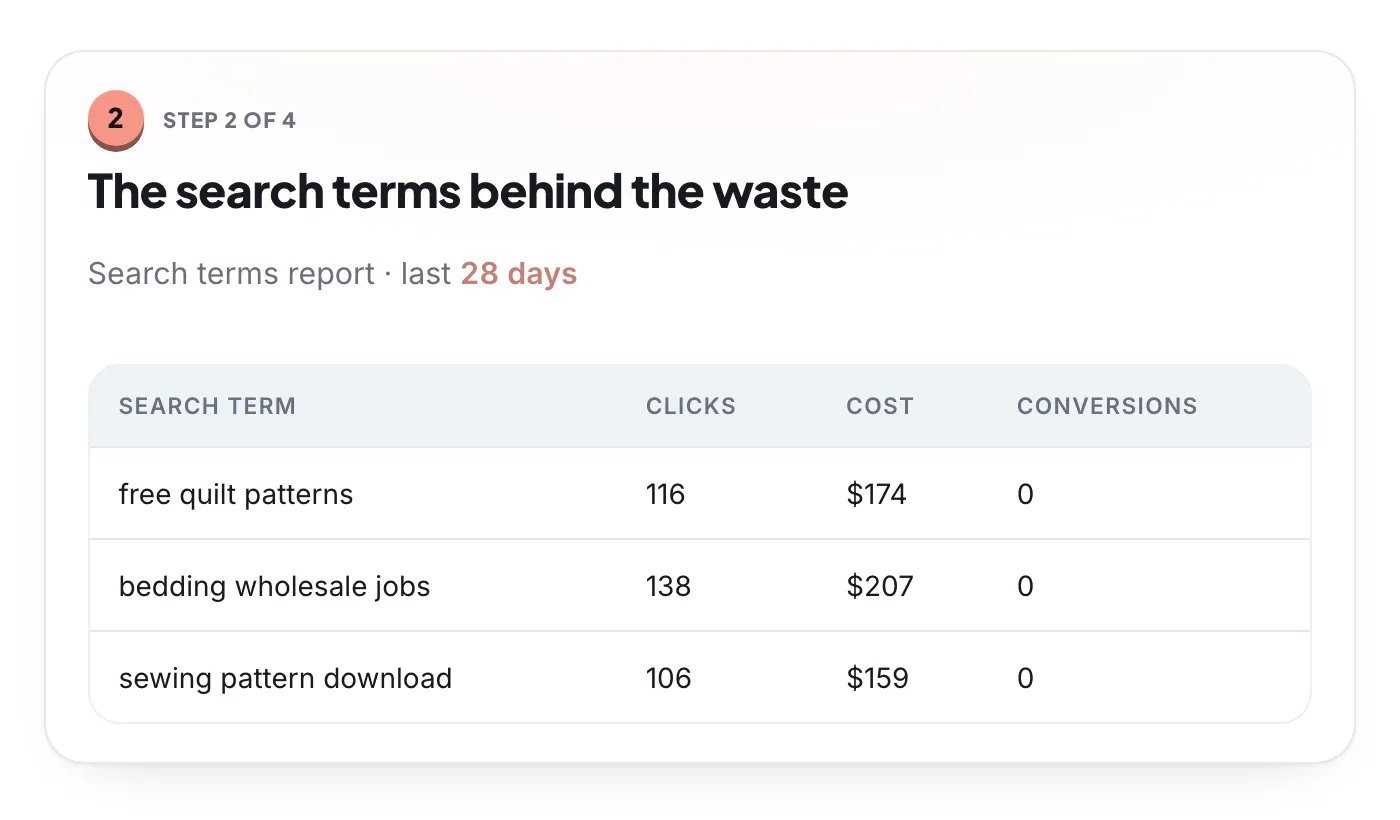
- Searches unrelated to the offer, with spend and no conversions. Open the search terms report and sort by cost.
- Networks, locations or hours nobody chose: Display in a Search campaign, location settings reaching people outside the service area, ads running when nobody answers the phone.
- Keywords and campaigns far above the client’s target cost per conversion. Judge these against their margins, not a rule of thumb.
- Brand searches bought twice, such as Performance Max taking brand traffic a Search campaign would get more cheaply.
Growth
- Campaigns that convert at a good cost and still lose impression share to budget.
- Converting searches that aren’t keywords yet.
- Products, services or regions the business sells that no campaign covers.
The Google Ads audit checklist has all twelve checks and where to find each one. A prospect doesn’t need all twelve in the report, only the ones that move money.
Size the opportunity honestly
Prospects remember the number you put on the opportunity. Make it one you can defend line by line.
- Give ranges, not points. “Between 400 and 600 a month” is honest. “537 a month” pretends to a precision you don’t have.
- Show the math. Every figure should trace back to a report the client can open themselves.
- Separate waste recovered from growth. Waste is spend you can stop or redirect, and it is fairly certain. Growth depends on demand and competitors, and it is less certain. Don’t add them into one total, and don’t count the same money twice: budget freed from waste often pays for the growth.
- Never promise a return on ad spend or a cost per conversion. You don’t control competitors, seasons or the client’s sales team. Promise what you will do and how you will measure it.
A worked example, in the account’s own currency. Over 90 days, searches plainly unrelated to the offer spent 1,800 with no conversions, about 600 a month. New irrelevant searches will keep appearing, so size it as 400 to 600 a month that can be moved to searches that convert. For growth, a campaign converting at 40 per conversion loses a fifth of its impressions to budget. Extra volume usually costs more than today’s average, so assume each extra conversion costs 20% to 50% more, 48 to 60. If the client adds 1,000 a month, that buys about 17 to 21 more conversions. Write down both the assumption and the result.
- Clear waste
- Needs the client’s data to confirm
View as table
| Item | Spend, 90 days | Group |
|---|---|---|
| Irrelevant searches | 1,800 | Clear waste |
| Keywords far above target cost | 1,100 | Needs the client’s data to confirm |
| Display in a Search campaign | 950 | Clear waste |
| Locations outside the service area | 620 | Clear waste |
| Hours when nobody answers | 400 | Needs the client’s data to confirm |
Structure the audit report
A prospect reads the first page and skims the rest. Build the report so the first page is enough.
| Section | What goes in | Length |
|---|---|---|
| Executive summary | The findings in one line each, the sized ranges with waste and growth kept apart, and the one thing to do first | Half a page |
| Tracking verdict | Whether Google Ads matches the client’s records, and by how much | A few lines |
| Findings | For each: what you saw, the evidence from their account, what it costs them, what to do | A page each at most |
| Quick wins and projects | Fixes that take an hour, apart from work that takes weeks | A short list |
| What you need from them | Data, decisions and access you’d need to go further | A short list |
| Appendix | Smaller findings, method, date range, data sources | As long as needed |
Lead every finding with evidence. “Your match types are too broad” is an opinion the client has heard before. A table of the eight searches that spent 1,100 last quarter with no conversions is a fact they can check in their own account.
Pick three to five findings
More than five and the important ones drown. Sort your candidates by impact and effort, and put only the top-left quadrant in the executive summary.
- Page views counted as primary conversions
- Irrelevant searches with spend and no conversions
- Display switched on in a Search campaign
- Campaigns rebuilt around margins
- Landing page that doesn’t match the ads
- Importing closed sales from the CRM
- Missing sitelinks and callouts
- Old bid adjustments under automated bidding
- Renaming campaigns
- Tests in ad groups with little traffic
Present it on a call, then leave the document
Don’t email a report cold. Book a call and walk through it with the account open on screen, so the client sees the numbers in their own Google Ads, not only in your slides.
- Start with what’s working. It shows you read the account fairly, and it tells them what not to break.
- Then the tracking verdict, then the findings in order of money at stake.
- Pause after each finding. The questions tell you what the client cares about, and that is what the proposal should lead with.
- Say what you don’t know. “This looks like waste unless these leads close by phone later. Can you check?”
Send the leave-behind the same day: the report as a PDF or shared document, written so someone who wasn’t on the call, an owner or a finance lead, can follow it. Assume it will be forwarded.
The ethics of a pre-sale audit
- Don’t change anything. Not a negative keyword, not a paused ad, even if you have the access and the fix is obvious. If you find something urgent, such as spend in a country they don’t serve, tell the client in writing the same day and let them act.
- Don’t keep access. Ask them to remove you after the call and confirm it. If they hire you, get access again on the terms of the contract.
- Keep it confidential. Their keywords, costs and customer numbers are theirs. Don’t reuse them for another client, and don’t put them in a case study without written permission. If you manage a competitor in the same market, say so before they grant access.
- No bait-and-switch. Don’t inflate findings to win the deal or present normal things as mistakes. The people and methods in the audit should be the ones who do the work.
Google’s rules for agencies point the same way. Its third-party policies ask partners to be honest about their company, services, costs and the results advertisers can expect, and rule out false, misleading or unrealistic claims. Its transparency requirements ask agencies that charge a management fee to say so in writing before a customer’s first purchase and on every invoice, and to give customers their Google Ads customer IDs when asked.
After the audit: proposal or hand-over
- If they want you to do the work, turn the report into the proposal. Each Plan finding becomes a line of work, the quick wins become the first weeks, and success is measured the way you agreed in the scope, in the client’s own records.
- If they want to do it themselves, hand it over. Add step-by-step instructions to each finding and point them to a working template, such as our Google Ads audit template. A useful audit that doesn’t become a contract still earns referrals.
Either way, keep the findings and the date. If you work together later, that audit is the baseline you measure against.
