Last checked against Google’s documentation on 30 September 2026.
The 15-minute search terms audit, in short
A search terms audit is a regular read of the search terms report: the list of what people actually typed before your ad showed. It works in two directions. You cut searches that spend without converting and don’t fit your business, and you promote searches that do convert into keywords of their own, so you choose the ad, bid and landing page that answer them.
Once a week is enough for most accounts. Set a 30-day range with the right columns, sort by cost, look for wrong intent and loose matches, group the words that keep repeating, decide each one, act at the right level, check you haven’t blocked anything that converts, and write it down.
- 0–2 minSet the range and columns
Last 30 days (90 in small accounts). Turn on Keyword, Match type and the added/excluded status.
- 2–6 minSort by cost, scan for waste
Read the top of the list for wrong intent, spend without conversions, and loose matches.
- 6–10 minGroup words and decide
Add up spend by repeated word. Mark each one exclude, keep, or promote.
- 10–13 minAdd negatives, promote winners
Narrowest level, deliberate match type. Converting searches become keywords.
- 13–15 minCheck and log
Test new negatives against converting searches. Write down what changed and why.
This page is the routine. For the deeper method behind negatives, including spend thresholds and starter lists, see how to find negative keywords.
Minutes 0–2: set the range and columns
In Google Ads, select Campaigns, then Search terms under Insights and reports, as described in Google’s search terms report guide. Review the whole account for the weekly pass, or one campaign when you are digging into it.
Use the last 30 days. A weekly review with a 30-day window overlaps on purpose: each search gets enough clicks to judge, and the status column shows which ones you already handled last week.
| Column | Why it’s in the routine |
|---|---|
| Cost, clicks, conversions, cost per conversion | The numbers every decision rests on. Add conversion value if you bid on value. |
| Keyword | Which of your keywords matched the search. Google notes it doesn’t show by default: select the columns icon, then Attributes, tick Keyword and select Apply. |
| Match type | How closely the search relates to the keyword: exact, phrase, broad, their close variants, and “AI Max”. |
| Added/Excluded status | Whether the search is already a keyword, already blocked by a negative, both, or neither. Google’s API documents these four states. |
| Campaign and ad group | Where the money went, so a negative or new keyword lands in the right place. |
Google’s report lets you save a column set. Save this one, and next week starts at minute two.
Minutes 2–6: sort by cost and scan for waste
Sort by cost, highest first, and read the top 20 to 30 rows. Mark three kinds of search:
- Wrong intent. Something you don’t sell, job seekers, free or do-it-yourself intent, existing customers looking for support, places you don’t serve. These get excluded at any spend.
- Spend without results. Relevant-looking searches that have spent around your cost per conversion or more with none. They go to the decision table below.
- Winners that aren’t keywords yet. Searches with conversions whose status is neither added nor excluded. Sort by conversions for a quick second pass to find them.
Check for match-type drift
Then read the Match type column for the rows you marked. Google says it shows how closely each search relates to the keyword that triggered it, and it flags close variants, which Google describes as including plurals, stem words, abbreviations and variants with the same meaning.
Drift is when looser matches quietly take a bigger share of spend: an exact keyword matching a close variant that means something else, a phrase keyword pulled into longer searches with a different need, or broad and AI Max rows taking most of the cost. Look at the Keyword column for those rows. If one keyword produces most of the waste, fixing that keyword, with a tighter match type or its own ad group, does more than a stream of negatives. A simple habit: note the share of cost from broad and AI Max rows each week. A jump right after a change is worth a closer look.
Minutes 6–10: group recurring words and decide
Reading row by row misses waste that is spread thin. Forty searches that each contain “free” and each spent a little never reach the top of a cost sort, but together they can outspend your worst single row.
Grouping fixes that. Split each search into single words, then add up spend and conversions for each word across every search it appears in. This is called n-gram analysis: a single word is a 1-gram, a two-word pair is a 2-gram. For a 15-minute pass you don’t need the full spreadsheet. Take the five or six words you noticed while scanning, filter the report to searches containing each word, and read the totals.
- Converting or unclear
- No conversions, wrong intent
View as table
| Item | Spend | Group |
|---|---|---|
| near me | 610 | Converting or unclear |
| price | 480 | Converting or unclear |
| free | 420 | No conversions, wrong intent |
| how to | 300 | Converting or unclear |
| jobs | 260 | No conversions, wrong intent |
| login | 150 | No conversions, wrong intent |
| reviews | 120 | Converting or unclear |
Then decide each flagged search or word with the same rules every week:
| Signal | Action | Level | Negative match type |
|---|---|---|---|
| Unrelated to what you sell, at any spend | Exclude | List or account level if wrong for the whole business; campaign otherwise | Broad on the single word, or phrase on a two-word idea |
| Relevant-looking, spent about your cost per conversion, no conversions | Watch one more week | None yet | None yet |
| Relevant-looking, spent about twice your cost per conversion, no conversions | Exclude, unless it is core to what you sell | Campaign or ad group | Exact, so neighbouring searches still run |
| Right search, wrong ad group | Exclude where it doesn’t fit | Ad group | Exact or phrase |
| Converts at or better than target, not yet a keyword | Promote to a keyword | The ad group whose ad and page fit it | None: add as an exact or phrase keyword |
| Converts, but costs too much per conversion | Keep; fix the ad, landing page, or bid | None | None |
| Your own brand, in a Performance Max campaign | Use a brand exclusion, not a negative | Campaign | None |
Adjust for conversion delay. If your customers usually convert a week or more after the click, don’t judge searches on the last few days alone.
Minutes 10–13: add negatives and promote winners
Add negatives at the narrowest level that works
In the report, tick the searches, select Add as negative keyword, choose an ad group, a campaign, an existing list or a new list, and save. Google’s negative keyword ideas guide notes that negatives added this way to a Search campaign are exact match by default. That blocks only that exact search. To block a word wherever it appears, change the match type with symbols before saving.
- Ad group: the search belongs in another ad group, or is wrong only for this one.
- Campaign: wrong for this campaign’s offer or area, fine elsewhere.
- Negative keyword list: wrong for several campaigns. Google allows 20 lists per account, 5,000 keywords each.
- Account level: wrong for the whole business. Account-level negatives apply to Search and Shopping inventory in Search, Performance Max, App, Shopping, Smart and Local campaigns, up to 1,000 per account, under Admin → Account settings → Negative keywords.
On match type: exact for one specific search that is wrong while close searches are fine, phrase for a multi-word idea that is wrong inside any longer search, broad for a single word that is wrong everywhere. Google’s negative keyword documentation says negatives handle casing and misspellings but don’t match close variants, so add plurals and synonyms yourself.
Promote converting searches to keywords
For each converting search that isn’t a keyword yet:
- Pick the ad group whose ads and landing page answer it best.
- Add it there as an exact match keyword, or phrase if you also want its longer versions. Ticking a search in the report usually offers an option to add it as a keyword; if yours doesn’t, add it from that ad group’s keywords page. Google Ads Editor’s search terms window has an Add as keyword button too.
- Check the ad mentions what the search asked for.
Why bother if broad match already found it? Google’s keyword prioritization rules put an exact keyword identical to the search ahead of broad and phrase keywords and ahead of Performance Max. Promoting a winner lets you decide which ad and page answer it, and gives it its own row of numbers. Promote on a pattern, not one lucky conversion.
Minutes 13–15: check for blocked converters, then log
- Test each new negative against converters. Set the report to 90 days, filter to searches with at least one conversion, then filter for each word you are about to exclude. Any match means a narrower match type or a lower level.
- Check against your own keywords. A negative that contains one of your keywords stops that keyword. Google’s recommendations include a “Remove conflicting negative keywords” type that flags these.
- Log the change. Date, search or word, action, level, match type, and the evidence: cost, clicks and conversions over the range. Change history shows what changed and who changed it; your log adds why.
Two weeks later, compare impressions and conversions for the campaigns you touched. If both fell together, review what you added. Our guide on undoing changes in Google Ads shows how to roll a change back.
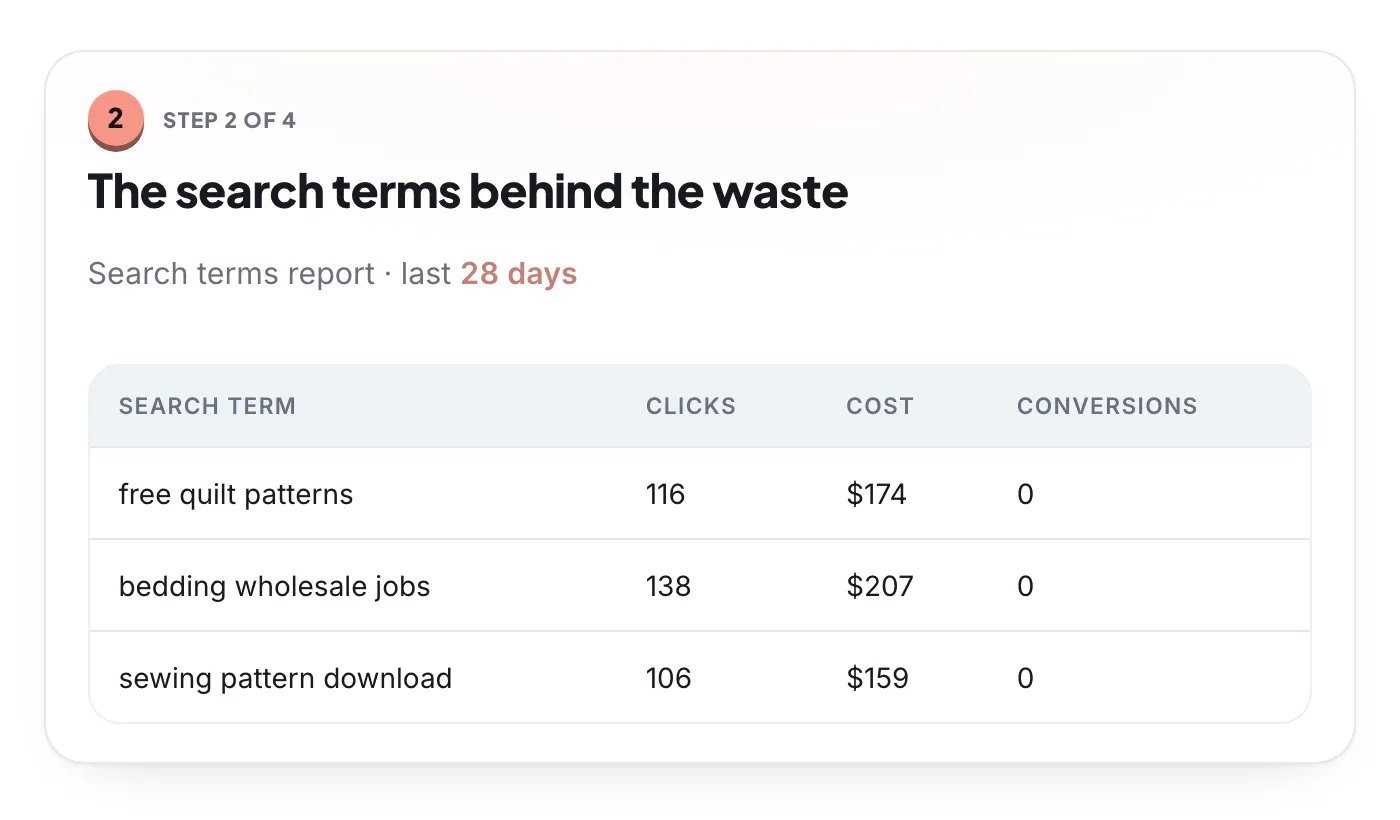
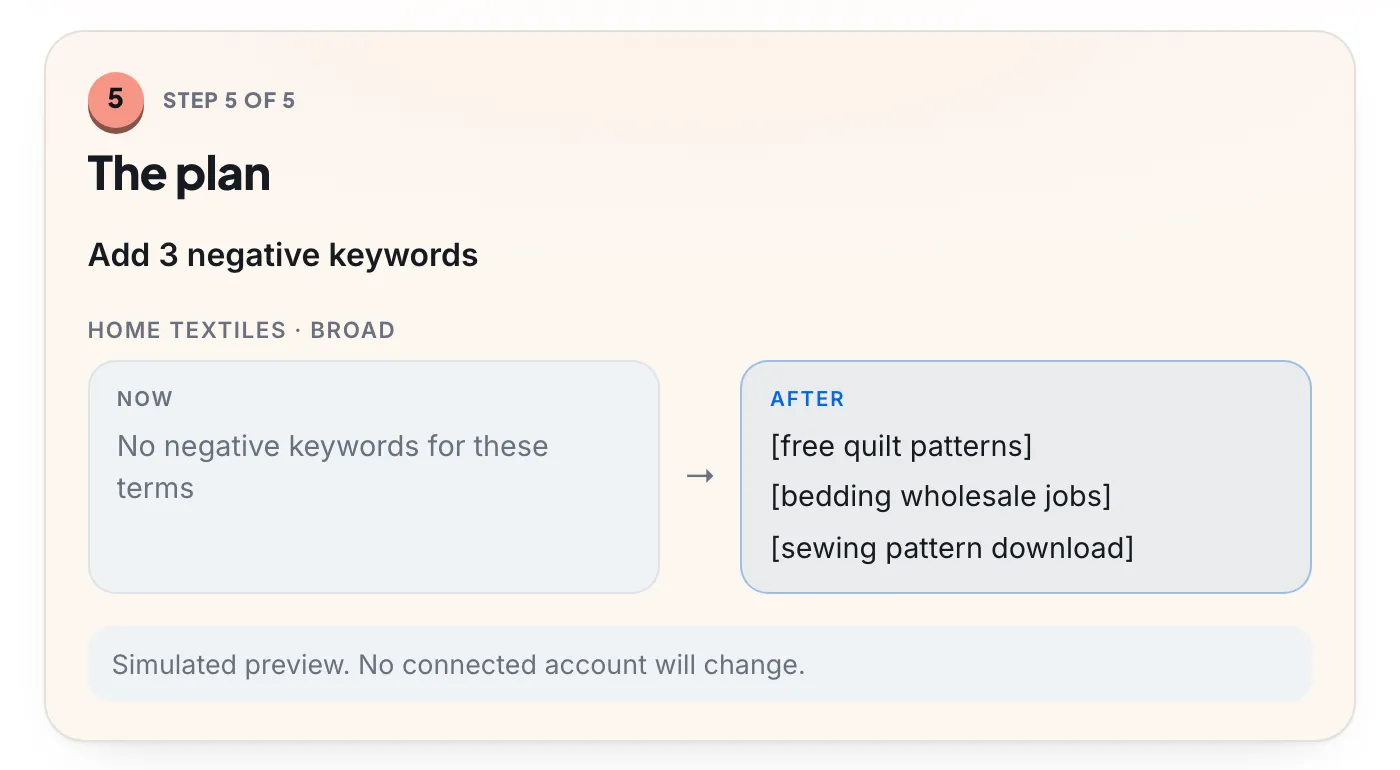
A finished review has two parts: the evidence, meaning each search with its clicks, cost and conversions over the range, and the plan, meaning the exact negatives and where they go. Here is what that looks like in a case from Boxoo’s demo workspace.
Performance Max and AI Max search terms
Performance Max
Performance Max searches are in the same report. From the view drop-down, choose Search terms and landing pages for Performance Max. Google’s Performance Max search terms page says the view shows search terms with their landing pages and ad formats, with data from March 2023, and advises weighing conversions over clicks and impressions.
To exclude a search, use campaign-level or account-level negatives, which apply to Search and Shopping inventory only; Google documents up to 10,000 per campaign and lets you estimate a negative’s impact before saving. Be stricter here than in Search: Google’s Performance Max guidance calls negatives “a highly restrictive control that can harm performance” and keeps them for brand safety and clearly irrelevant terms. Use brand exclusions for brand searches. A converting Performance Max search you want more control over can become an exact keyword in a Search campaign. More in Performance Max negative keywords.
AI Max for Search
AI Max adds matches beyond your keywords through search term matching. Google’s AI Max reporting guide says to filter Match type for “AI Max”, add the Source column, and use the Search terms and ad combinations view to see each search with the headline and landing page it got. Two cautions from the same page: the AI Max filter can show lower numbers because it leaves out “Other search terms”, and you should wait at least two weeks after turning AI Max on before changes such as adding negatives. In the Keywords report, the rows “Total: AI Max expanded matches” and “Total: AI Max landing page matches” show how much spend it took. See the AI Max upgrade guide for the settings.
Hidden searches and low-volume accounts
The report isn’t the full list. Google says it omits searches without enough query activity, for privacy, and shows terms used by a significant number of people. So the rows you see won’t add up to the campaign total, and the gap is spend you can’t judge row by row.
When that gap is large, open search terms insights on the Insights page of the Campaigns menu. It groups searches into categories and subcategories with their performance, and puts lower-spend searches into a grouped bucket rather than showing them. It covers Search, Performance Max and Shopping campaigns, for any range after March 2023.
In an account with few clicks, the routine still works with a few changes:
- Lengthen the range to 90 days, or everything since your last review.
- Run it monthly instead of weekly. The steps stay the same.
- Judge words, not rows. Single searches rarely collect enough clicks; a word that repeats across many does.
- Exclude on meaning. A job search is wrong at two clicks. Relevance doesn’t need statistics; performance does.
